
Any journals publisher will know that understanding the structure of the organizations that make up their customer base, and the relationships between those organizations, is hard. Organizational structures may be:
- large – a university may have huge numbers of departments, libraries, associated hospitals and affiliated colleges
- multi-level – departments may be grouped into faculties, university hospitals may have their own departments, and universities themselves may belong to wider groups such as buying consortia
- complex – an organization might have more than one ‘parent’, in that it might be governed or funded by more than one entity
Understanding this structure may be difficult, but it is also very important – your interaction with one node within the structure can affect your interaction with other nodes:
- If an umbrella organization has bought a subscription to a journal, do all its component organizations inherit access to that journal?
- If you’ve made sales to a particular department, is its parent organization a weaker prospect than a university with no sales at any level?
- Which organizations are affected by consortia deals?
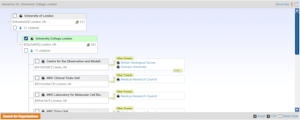
DataSalon’s solution to this conundrum is a strong hierarchical data model, supported by the relationship information freely available from ROR (or alternatively from Ringgold if you have paid for a licence). Our hierarchy viewer (available in both our MasterVision and our PaperStack services) represents this information graphically, providing a user-friendly way of viewing, navigating and understanding the relationships between organizations.

The hierarchy viewer helps you to understand both organizational structures and how your customer interactions fit into those structures:
- A full-screen option plus the ability to expand and contract nodes make it easy to navigate around the large quantity of information.
- The family tree-style display provides an easy to comprehend representation of multi-level relationships.
- Multiple parents are clearly displayed, and you can redraw the tree to change which parent is in the main view.
- You can click through to the full data for any node, to see all customer interactions at that level.
- The viewer can be used as the basis for a search, by checking the nodes you want to include – this is an easy way to pull together the information for all levels of a particular organization.
Because the hierarchy viewer is available in both MasterVision and PaperStack, you can make use of it whatever the type of insight you’re seeking – from reporting on sales at consortia levels to assessing the impact of read and publish agreements. To find out more, please get in touch for a demo.

