
Thinking about signing up to DataSalon’s PaperStack service? Here’s a short guide to what’s involved.
Set-up
The good news is that this is extremely simple – PaperStack includes out-of-the-box integration with the ScholarOne and Aries Editorial Manager APIs. Once access is set up, DataSalon take care of all the technical details of collecting the data, pulling your entire journal portfolio into a single repository, even if you use both systems or have different sites for different journals. You just need to make a few simple configuration decisions:
- Coverage: How many years of data do you want to be able to track? Are there any journal titles which should be excluded?
- Reference dataset: As standard, we enhance data by linking it to Crossref metadata and contextualise it by matching it to ROR, the Funder Registry and ORCID, all of which are freely available – but if you’ve paid for a Ringgold licence than we can use that in place of ROR.
- Optional modules: Would you like to include rejected article tracking and citation counts for rejected articles? By enabling our automatic Crossref lookup process, you can discover the subsequent fate of your rejected articles and the citations they’ve received.
Data insights
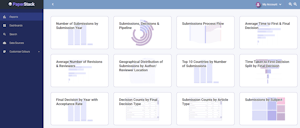
When you first log into your new PaperStack site, you’ll see that our standard set of reports have already been set up for you. These give the insights needed by every editorial team, from tracking article submissions and acceptance rates to assessing the efficiency of your journal review process.

There’s no steep learning curve involved in getting to grips with the system – all the user-friendly reports work in basically the same way:
- Charts have consistent breakdown and filtering options.
- Data is automatically displayed in the most suitable visualisation and with appropriate breakdown fields.
- All charts are interactive, so that you can always click through to see the full list of articles, people or institutions behind each segment of a report.
- Each article, person or institution record has a consistent summary view, plus further information appropriate to the record type – for articles, a workflow timeline; for people, their author and reviewer activity; for institutions, a visualisation representation of the organisational hierarchy.
Customization
For some publishers, the standard PaperStack set-up gives them all that they need. Others may have additional specific use cases, for example to track key performance indicators or to cater for the particular ways in which they handle open access mandates. If that’s the case for you, we can customize your PaperStack site to meet those requirements – we’ll advise on any extra data required, integrate that data with your core data, and set up custom reports.
If that’s fired your enthusiasm, please get in touch to find out more and request a demo.

